
- Why Are Professional Talking Head Videos So Important?
- What Essential Gear Do You Need for High-Quality Talking Head Videos?
- How Can You Optimize Your Set and Filming Environment?
- What Are the Key Post-Production Steps to Polish Talking Head Videos?
- When Should You Consider Professional Video Editing Services?
Published May 28, 2026 · 15 min read
How to Make Talking Head Videos Look Professional: A Comprehensive Guide
In today’s digital landscape, knowing how to make talking head videos look professional is no longer an option, it’s a necessity for anyone looking to build a strong online presence. Whether you’re a content creator, an educator, or a business owner, your talking head videos are often the first impression you make. They allow you to connect directly with your audience, convey your message clearly, and establish credibility. But what separates a truly impactful talking head video from one that gets scrolled past? It’s all in the details, from pre-production planning to expert post-production polish. Our team at Motion Edges understands the nuances of crafting compelling visual content that resonates and performs.
💡 Many creators underestimate the power of seemingly small details like consistent eye-level framing or subtle background blur. These elements significantly contribute to the perceived professionalism and viewer comfort, making your message more impactful.
Why Are Professional Talking Head Videos So Important?
Professional talking head videos are crucial because they directly impact your audience’s perception of your brand, expertise, and reliability. High-quality visuals and audio signal attention to detail and respect for your viewers, leading to increased engagement, better information retention, and stronger brand authority. They build trust by presenting you as a credible and polished source.
In an increasingly visual world, your video content acts as a digital handshake. A poorly produced talking head video, with bad lighting or muffled audio, can inadvertently signal a lack of professionalism or care, even if your message is brilliant. Conversely, a polished, well-produced video captures attention, holds interest, and elevates your entire online persona. According to Wyzowl’s 2024 State of Video Marketing report, 92% of marketers say video has helped them increase the understanding of their products or services. This clearly demonstrates the tangible benefits of investing in quality video.
Building Credibility and Trust
When you present yourself in a well-lit, clearly audible, and aesthetically pleasing manner, you automatically project an image of authority and trustworthiness. Viewers are more likely to trust information delivered by someone who appears competent and professional. This isn’t just about looking good, it’s about eliminating distractions that might make viewers question your content’s legitimacy. Our goal at Motion Edges is always to enhance your content’s underlying message, not overshadow it.
Boosting Engagement and Retention
High-quality talking head videos are inherently more engaging. Crisp visuals, clear audio, and dynamic editing keep viewers hooked from start to finish. If your video is visually appealing and easy to listen to, people are more likely to watch longer, absorb more information, and even share your content. This extended viewing time is a strong signal to platforms like YouTube and Google that your content is valuable, potentially boosting your reach.
Enhancing Brand Authority
Consistent, professional video content strengthens your brand’s presence and establishes you as an expert in your field. When every video you release meets a high standard, it builds a reputation for excellence. This consistency helps differentiate you from competitors and positions your brand as a leader. It’s an investment in your long-term brand equity, showing your audience that you take your work, and their time, seriously.
What Essential Gear Do You Need for High-Quality Talking Head Videos?
To produce high-quality talking head videos, you need a reliable camera, a dedicated external microphone for clear audio, and a basic lighting setup to illuminate your face and minimize shadows. While high-end equipment isn’t always necessary, investing in these three core components significantly elevates your video’s production value and ensures your message is delivered effectively.
While a Hollywood studio setup might be out of reach for most, you’d be surprised how much you can achieve with a modest budget and smart choices. The key is to prioritize the elements that have the biggest impact on viewer experience: clear visuals and pristine audio. Let’s break down the essential gear you’ll need to truly understand how to make talking head videos look professional.
Camera Choices: From Smartphone to Mirrorless
Your camera is obviously fundamental. Modern smartphones, especially newer models, have incredible video capabilities, often shooting in 4K. They are excellent starting points for many creators. For a step up, consider a dedicated webcam like the Logitech Brio or Razer Kiyo for better low-light performance and wider field of view than most built-in laptop cameras. If you’re serious about creating a professional look, a mirrorless camera or a DSLR with a good lens offers superior image quality, depth of field control, and low-light performance. Brands like Sony, Canon, and Panasonic offer fantastic options that provide a truly cinematic feel.
Mastering Audio: Microphones Are Non-Negotiable
Poor audio is often cited as the number one reason viewers click away from a video. Your visuals can be stunning, but if your audio is muddled, echoey, or inconsistent, your audience won’t stick around. An external microphone is absolutely essential. We recommend a lavalier microphone (a small clip-on mic) for close, clear sound, or a USB condenser microphone like the Blue Yeti or Rode NT-USB Mini if you’re recording at a desk. For more advanced setups, a shotgun mic positioned just out of frame can capture excellent directional audio. Always monitor your audio with headphones during recording to catch any issues.
✅ Always record a few seconds of ‘room tone’ before speaking. This silent audio can be used by editors to seamlessly fill gaps or reduce background noise during post-production, leading to a much cleaner sound profile.
Lighting Setups: Illuminating Your Message
Good lighting can transform an amateur video into a professional one. The goal is to illuminate your face evenly, eliminate harsh shadows, and separate you from the background. A simple three-point lighting setup is ideal: a key light (your main light source, often slightly off-center), a fill light (to soften shadows created by the key light), and a back light (to create separation from the background). If you’re on a budget, even a large window can serve as an excellent key light, supplemented by a reflector or a small LED panel. Ring lights are popular for talking heads, providing even, flattering illumination directly on your face.
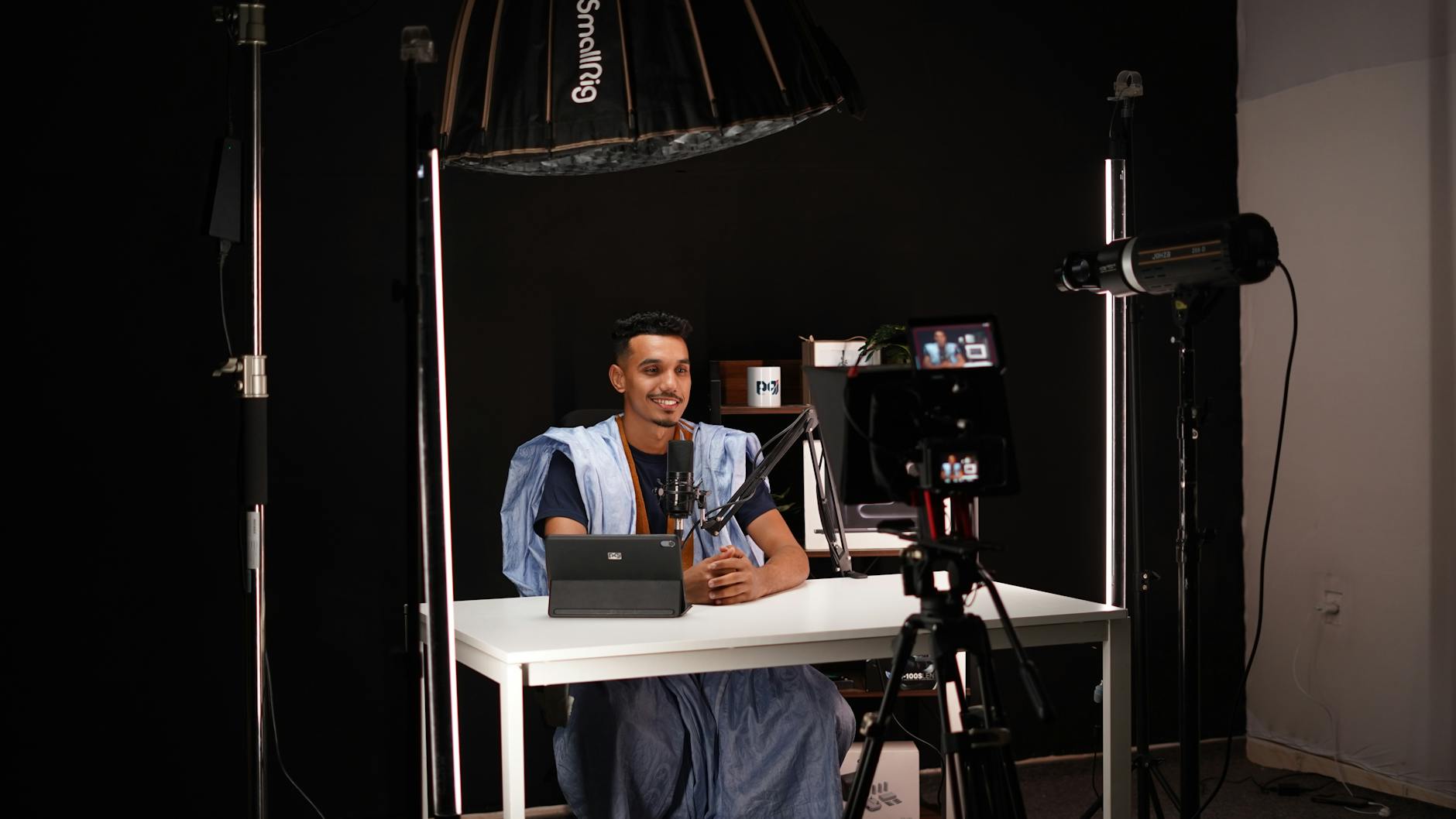
A well-lit subject and clean background are fundamental to professional talking head videos.
How Can You Optimize Your Set and Filming Environment?
Optimizing your set and filming environment involves choosing a clean, visually appealing background, applying effective framing and composition techniques, and developing a confident on-camera presence. These elements contribute significantly to the overall professionalism and aesthetic quality of your talking head videos, ensuring your audience remains focused on your message without visual distractions.
Beyond the gear, your filming environment plays a pivotal role in how your talking head videos are perceived. A cluttered background or awkward framing can detract from your message, regardless of how good your camera or microphone is. Let’s explore how to set the scene to truly shine and understand how to make talking head videos look professional.
Background Best Practices
Your background should be clean, uncluttered, and ideally, provide some visual interest without being distracting. Avoid busy patterns, messy rooms, or strong backlighting that could silhouette you. A simple, well-lit wall, a bookshelf with tastefully arranged items, or a blurred natural setting can work wonders. Consider your brand’s aesthetic; a minimalist background might suit a tech review, while a cozy, decorated office might be better for a lifestyle vlogger. Ensure there’s enough distance between you and the background to allow for a pleasing depth of field, if your camera allows.
Framing and Composition Techniques
Proper framing is crucial. Generally, the ‘rule of thirds’ applies: imagine your screen divided into nine equal sections by two horizontal and two vertical lines. Place your eyes along the top horizontal line and your body along one of the vertical lines. Leave a small amount of ‘headroom’ above your head, and ensure you’re looking directly into the camera lens, not at your reflection or a monitor. Experiment with medium close-ups, showing your head and shoulders, as this is a common and effective frame for talking head videos.
| Element | Amateur Mistake | Professional Practice |
|---|---|---|
| Background | Cluttered, distracting, too close | Clean, relevant, blurred, distanced |
| Framing | Too much headroom, cut off, off-center | Rule of thirds, eyes on top line, sufficient headroom |
| Eye Contact | Looking at screen, reading notes | Directly into lens, confident, engaging |
| Lighting | Harsh shadows, underexposed, backlit | Even, soft, three-point setup |
| Audio | Echoey, muffled, background noise | Clear, consistent, external microphone |
On-Camera Presence and Delivery
Even with perfect technical setup, a dull on-camera presence can undermine your video. Practice your delivery, aiming for a confident, conversational, and energetic tone. Use natural hand gestures and facial expressions to convey emotion. Make direct eye contact with the camera lens, as if you’re speaking to a single person. If you’re using a teleprompter, ensure it’s positioned close to the lens to maintain natural eye lines. Remember, authenticity often trumps perfection; let your personality shine through!
⚠️ Avoid filming in rooms with hard, reflective surfaces like bare walls or tile floors. These can cause excessive echo and reverberation, making your audio sound hollow and unprofessional, even with a good microphone.
What Are the Key Post-Production Steps to Polish Talking Head Videos?
The key post-production steps to polish talking head videos include precise editing for pacing and impact, professional color grading to enhance visual appeal, and meticulous audio sweetening for crystal-clear sound. These stages are where raw footage transforms into a professional, engaging piece of content that truly captivates your audience and reinforces your message.
Once your footage is captured, the real magic happens in post-production. This is where you refine, enhance, and perfect your video. For many, this is the most challenging part, but it’s also where Motion Edges excels. Understanding these steps is paramount if you’re serious about how to make talking head videos look professional.
Editing for Impact: Pacing and Cuts
Effective editing means more than just cutting out mistakes. It’s about maintaining viewer engagement through dynamic pacing. Remove dead air, stutters, and unnecessary pauses. Use jump cuts sparingly and strategically to keep the narrative moving. Incorporate B-roll footage or graphics to illustrate points and break up the monotony of a continuous talking head. Text overlays for key points or names can also add professional polish. Remember, every second counts, so be ruthless in trimming anything that doesn’t add value.
Color Grading and Correction
Color grading is like adding a filter to your video, but with far more control. Color correction fixes inconsistencies in white balance and exposure, ensuring your skin tones look natural and colors are accurate. Color grading then applies a stylistic look, enhancing the mood or brand aesthetic. Even subtle adjustments can make a huge difference, transforming flat footage into something vibrant and professional. Tools like Adobe Premiere Pro, DaVinci Resolve, and Final Cut Pro offer robust color grading capabilities.
Audio Sweetening and Noise Reduction
Just as important as visual polish is audio refinement. Audio sweetening involves equalizing the sound to make voices clear and consistent, compressing audio to balance loud and soft parts, and applying noise reduction to minimize background hums, clicks, or echoes. This is a critical step that often goes unnoticed when done well, but is glaringly obvious when neglected. Our professional editing services at Motion Edges always prioritize impeccable audio quality, ensuring your message is heard loud and clear.
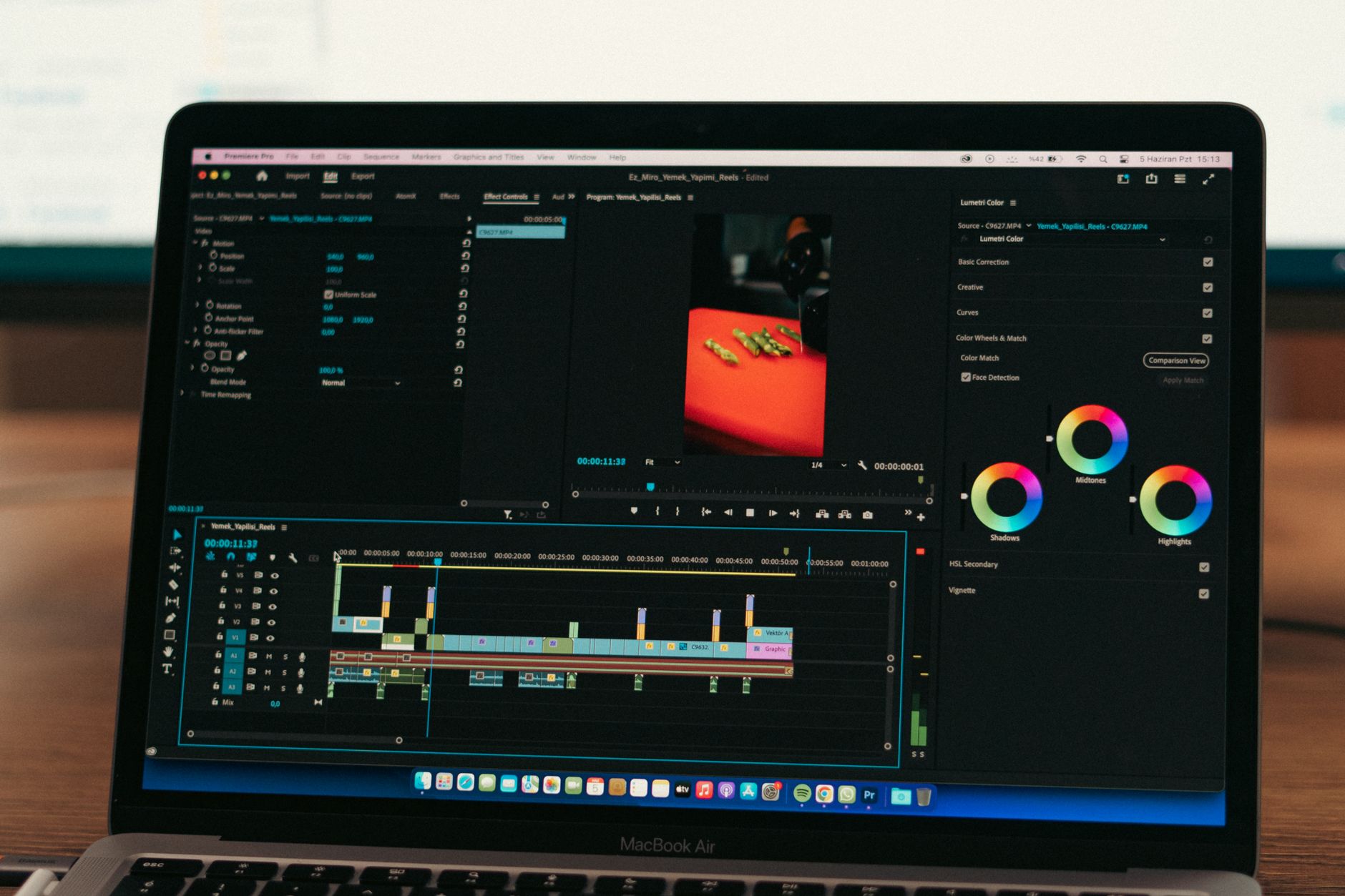
Post-production is where the raw footage transforms into a polished, professional talking head video.
When Should You Consider Professional Video Editing Services?
You should consider professional video editing services when you lack the time, expertise, or software to produce high-quality videos yourself, or when the stakes for your content are particularly high. Outsourcing editing ensures a consistent, polished brand image, frees up your time for content creation, and provides access to advanced techniques and tools that elevate your talking head videos beyond amateur quality.
While DIY can get you started, there comes a point where investing in professional help becomes a strategic decision. If you’re struggling to achieve the level of polish you desire, or if your time is better spent on other aspects of your business or content creation, it’s time to consider a professional video editing agency like Motion Edges. This is a key step for many who truly want to understand how to make talking head videos look professional without the personal time investment.
Saving Time and Resources
Video editing is incredibly time-consuming, often taking several hours for just a few minutes of finished footage. By outsourcing to experts, you free up your valuable time to focus on what you do best: creating compelling content, developing your business, or engaging with your audience. This also saves you from investing in expensive software and the steep learning curve required to master it.
Accessing Expert Skills and Tools
Professional editors bring years of experience and a deep understanding of pacing, storytelling, color science, and audio engineering. They use industry-standard software and techniques to achieve results that are difficult for an amateur to replicate. Our team at Motion Edges, for example, has the expertise to transform raw footage into a captivating narrative, ensuring every cut, every transition, and every sound bite enhances your message. You can see our portfolio to get an idea of the quality we deliver.
Ensuring Consistent Brand Quality
Maintaining a consistent brand aesthetic across all your video content is vital for recognition and professionalism. A professional editing service can help establish and adhere to a specific style guide, ensuring your talking head videos always reflect your brand’s identity, from color grading to graphics and sound design. This consistency builds trust and reinforces your brand’s presence in the market. We offer transparent pricing and tailored packages to meet diverse needs, making professional quality accessible.
💡 Many successful YouTubers and businesses rely on professional editors to maintain their high output and quality. It’s a scalable solution that allows you to focus on content strategy and delivery, rather than getting bogged down in technical post-production work.
Mastering how to make talking head videos look professional is an ongoing journey that combines technical know-how with creative vision. From selecting the right gear and optimizing your filming environment to meticulously polishing your footage in post-production, each step contributes to a final product that captivates and converts. Remember, a professional talking head video isn’t just about looking good, it’s about effectively communicating your message, building trust, and establishing your authority. If you find yourself overwhelmed by the technical demands or simply want to elevate your content to the next level, don’t hesitate to reach out. Our team at Motion Edges is here to help you achieve that polished, impactful look your brand deserves. Get in touch with our team today to discuss your video editing needs and learn more about our professional editing services.
What is the most important element for professional talking head videos?
While all elements are important, superior audio quality is arguably the most crucial. Viewers are often more forgiving of less-than-perfect visuals if the audio is crystal clear and consistent, but poor audio almost always causes viewers to disengage quickly.
Can I make professional talking head videos with just a smartphone?
Yes, absolutely! Modern smartphones are capable of capturing high-quality video. The key is to supplement your phone with good external audio, adequate lighting, and stable framing (using a tripod), and then apply professional editing techniques in post-production.
How can I reduce background noise in my talking head videos?
To reduce background noise, record in a quiet environment, use an external microphone positioned close to your mouth, and consider acoustic treatment for your room (e.g., blankets, soft furnishings). In post-production, use noise reduction tools available in most video editing software.
What’s the ideal length for a talking head video?
The ideal length varies depending on your platform and audience. For social media, shorter videos (under 2-3 minutes) often perform best. For educational or YouTube content, videos can be longer (5-10+ minutes), but maintaining engagement through dynamic editing, B-roll, and clear delivery is essential.
Should I use a teleprompter for my talking head videos?
A teleprompter can be very beneficial for ensuring you cover all your points concisely and maintain eye contact with the camera. However, practice using it so your delivery sounds natural and conversational, not like you’re reading directly from a script. Authenticity is key.
How often should I produce talking head videos?
Consistency is more important than frequency. Establish a realistic publishing schedule you can stick to, whether it’s weekly, bi-weekly, or monthly. This helps build audience expectation and loyalty, reinforcing your brand presence over time.
Ready to Elevate Your Video Content?
Motion Edges delivers professional video editing that drives engagement and growth. Our dedicated editors learn your style and deliver consistently polished content.